Archiving an Asset to MediaCentral | Archive Production
Starting in MediaCentral | Cloud UX 2025.10, you can archive Production Management assets and their media to the MediaCentral | Archive Production database connected to MediaCentral | Cloud UX.
Keep in mind that your Production Management workgroup must be properly configured with the Archive service in the Production Management Administrator App, and must also have an appropriate Archive profile available. For more information on how to configure the service and profile, see the Avid Production Services Setup and User’s Guide.
To archive an asset to Archive Production:
-
Navigate to the location of the Production Management asset you intend to archive.
-
Do one of the following:
-
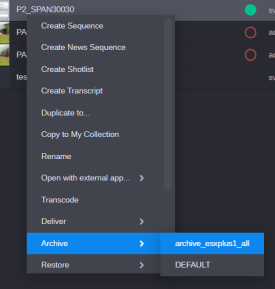
Right-click on the asset and select Archive from the context menu.
-
Select the asset, click the App Menu button and select Archive.
-
-
Select the target Archive profile from the available profile list.
The Archive process is then started and you should be able to check its status in the Process app.