Working with the Clip Mover App
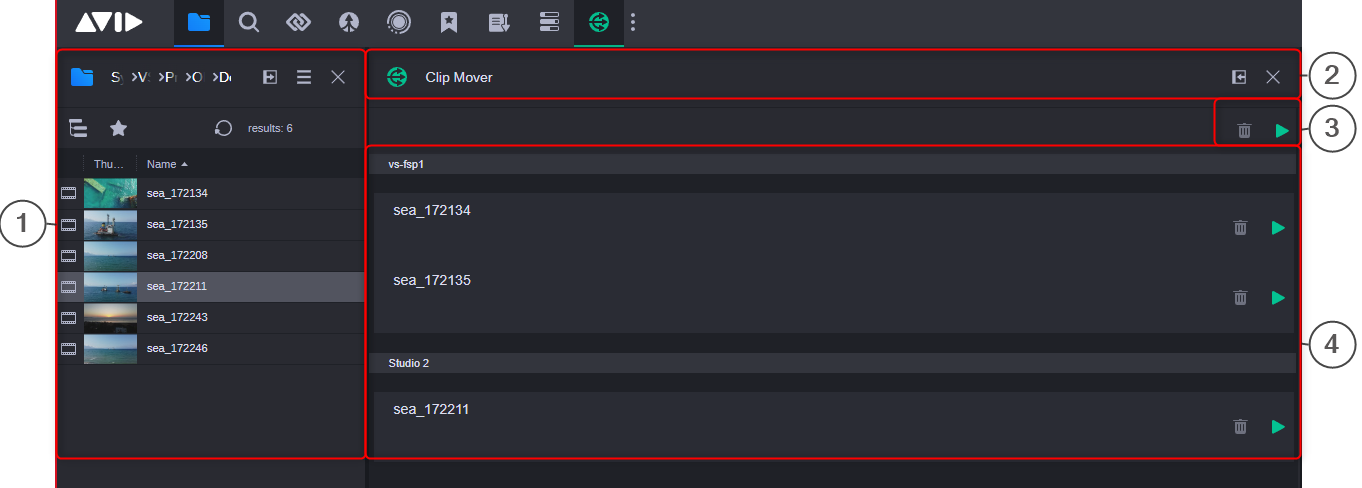
You can access the Clip Mover app by clicking its associated icon in the Fast Bar at the top of the user interface. The following illustration shows the Clip Mover app with two FastServe Playout groups.
|
|
Section |
|---|---|
|
1 |
Browse app (docked) |
|
2 |
Clip Mover app header |
|
3 |
Clip Mover toolbar, which allows to start a simultaneous transfer for all files in all FastServe Playout groups, or remove all files from the transfer queues. |
|
4 |
FastServe Playout groups, as configured in the Clip Mover settings in the MediaCentral Cloud UX Configuration Settings app. |