Exporting the Translation
The Transcript tab lets you export each
To export a
-
Select the
-
 Click the Export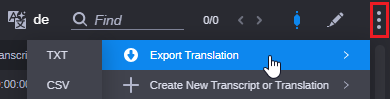
-
Select the file format from the menu. TXT, CSV and SRT are supported.
An <asset name>.txt, <asset name>.csv or <asset name>.srt file is saved to the download location specified in your web browser’s settings.
n Depending on your browser settings, you might be prompted for a download location.